One library, every chat — that's the whole point
Tenor and Giphy serve everyone the same public catalog. Telegram's saved-GIF list lives only inside Telegram. Your vids&gifs library is yours, organized into folders, and the same data backs inline pickers in both Telegram and Discord — no copies, no per-platform rebuilds.
Private folders
Group GIFs and videos by theme — work, friends, a specific group joke. The 'active' folder you pick on the website is exactly what the bots search inside.
Scoped search
Tag-based search runs against your folder, not a public catalog. Type three letters in the Telegram inline picker; the right reaction is one tap away.
Read-only sharing
Send a friend a share link to a folder. They see your collection live as you add to it, no copies and no manual sync. Perfect for a curated group library.
How it works in each chat
Telegram
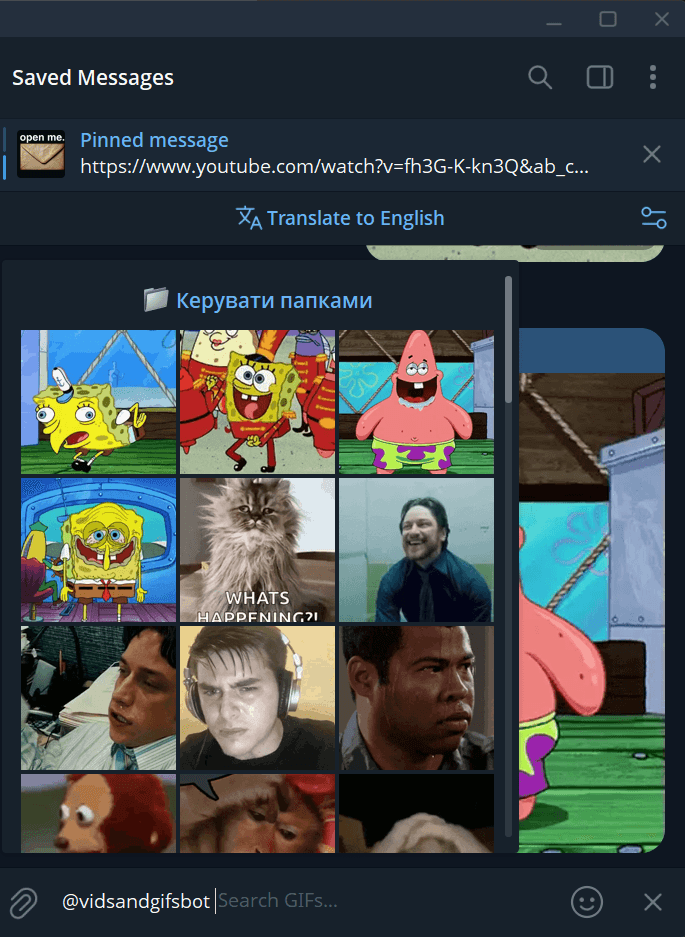
- In any chat, type @vidsandgifsbot followed by a search term.
- Telegram's native inline picker shows a grid of GIFs from your active folder.
- Tap one — it sends instantly, sourced from your private library, not Tenor.
- Forward any GIF to the bot to add it to your active folder.
Discord
- Add the vids&gifs bot to your server (or use it in a DM).
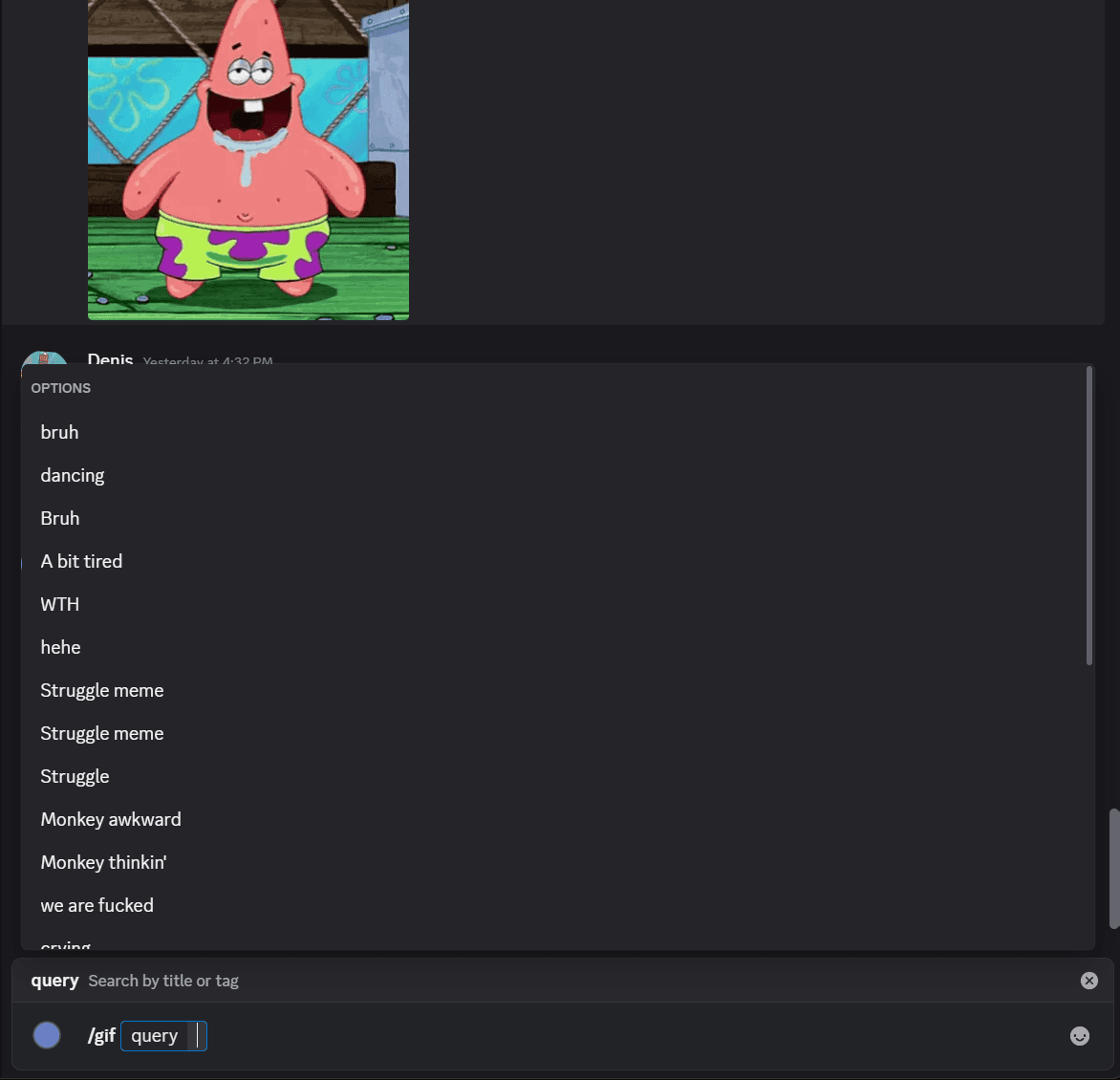
- Type /gif and start typing a search term — slash autocomplete shows your folder.
- Pick one and the bot posts it to the channel.
- Use /upload-file to add a new GIF without leaving Discord.
What you get on the free tier
Private by default
Folders are private until you explicitly share them. Uploading a GIF doesn't publish it — your library is yours.
Auto-file from chats
Forward any GIF to @vidsandgifsbot or use Discord's /upload-file. The clip lands in your active folder and is searchable from every chat in seconds.
Tag and search
Tag GIFs once and the bots match against tags, not just filename. Three-letter searches in the inline picker hit the right clip the first time.
Read-only share links
Hand a friend a link and they get live read-only access to a folder — the bots search through their account but find your set.
Build your library in 5 minutes
Sign up, drag a few GIFs in, connect Telegram and Discord, and the inline picker is yours in every chat. No payment information, no mandatory plan.
Frequently asked questions
What is a private GIF library?
A private library is a personal collection of GIFs and short videos that only you can see and search. Unlike Tenor or Giphy — which serve everyone the same public catalog — a private library contains exactly the reactions, jokes, and clips you've curated. On vids&gifs your library lives in folders you control, and the same library powers the Telegram inline picker and the Discord /gif autocomplete, so you don't have to maintain a separate set per platform.
How is this different from Telegram's built-in GIF saved list?
Telegram's saved-GIF list is per-account, lives only inside Telegram, and has no folders, no search beyond filename, and no way to share it with a friend. Your vids&gifs library is folder-based (you can keep separate sets for separate chats), tag-searchable, and accessible from a website, Telegram, and Discord with the same data backing all three. If you switch phones or sign in on a new device, everything is still there — and you can grant a friend read-only access to a folder so they can use your collection without rebuilding it themselves.
How do I send GIFs inline in Telegram?
Connect your Telegram account once in Settings → Connections, then in any chat type @vidsandgifsbot followed by a search term. Telegram's native inline picker pops up a grid of GIFs from your active folder — tap one and it sends instantly. Forwarding any GIF to the bot adds it to that same folder, so your library grows from inside the chat.
How do I send GIFs inline in Discord?
Add the vids&gifs Discord bot to your server (or use it in a DM), connect your account in Settings → Connections, and type /gif. Discord's slash-command autocomplete shows GIFs from your active folder as you type — pick one and the bot posts it to the channel. Use /upload-file to add a new GIF straight from Discord; it lands in your active folder and stays searchable on the website too.
What's an active folder, and why does it matter?
You can keep multiple folders (work GIFs, friends GIFs, a specific group joke, etc.) and pick one as 'active' at any time. The active folder is the search scope for the Telegram inline picker and the Discord /gif autocomplete. So when you switch from a work chat to a friends chat, you flip your active folder once on the website, and both bots immediately start surfacing the right set of reactions.
Can I share a folder with friends?
Yes. Open any folder and hit Share — that produces a read-only link. Anyone with the link sees your folder live as you add to it, with no copies and no manual sync. Their copy stays in sync automatically. Great for a friend group that wants a shared reaction library curated by one person.
Is my library actually private?
Yes. Your folders default to private — only you and accounts you've explicitly shared a folder with can see what's inside. Uploading something to your library does not publish it. The only way a GIF becomes public is if you manually flip the visibility on the upload itself.
Is this free?
Yes. Building folders, connecting Telegram and Discord, sending inline GIFs, sharing folders, and uploading new media all work on the free tier. A paid Pro tier exists for higher daily upload quotas, but every cross-chat library feature is on the free plan with no advertising.
What if I just want to convert a GIF to MP4 (or back)?
We have free standalone tools for that — no signup needed. Use the GIF → MP4 converter at vidsandgifs.com/tools/gif-to-mp4 or the MP4 → GIF converter at vidsandgifs.com/tools/mp4-to-gif. Both run entirely in your browser via ffmpeg.wasm; the file never leaves your device.
Free side-tools
Need to convert a clip before you upload it to your library? We have two free standalone converters that run entirely in your browser — no signup, no upload.